🪄 It's Magic — Multi-Device Multiplayer Game
·
4min
·
Marcus Aas Jensen
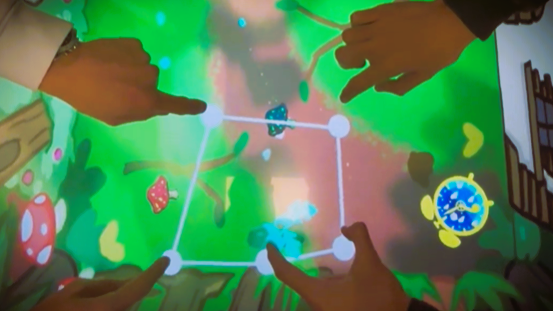
It’s Magic is an experimental multiplayer game exploring distributed interaction across several devices.
Created as a college final project in a team of 4, it combines Unity clients and a mobile app to create a cooperative, immersive potion-making adventure.
💻 GitHub Repository
✨ Overview
Three players cooperate in a magical world using three different interfaces:
- Interactive Table – Top-down view of the forest and workshop.
- Vertical Screen – Side views for detailed actions.
- Mobile Phone – Special tools and environment control.
The game encourages communication and coordination as each device provides unique perspectives and actions.
🎯 Goal of the Game
Play as three wizards working together to brew a potion before time runs out.
- 🍄 Harvest Ingredients – Gather forest ingredients and store them in the bag.
- 🥣 Prepare the Cauldron – Toss ingredients into the cauldron inside the house.
- 🪵 Heat the Cauldron – Move it to the chimney when bubbling starts.
- 🔥 Light the Fire – Use the bellows to ignite the flame.
- ⚗️ Finish the Potion – Wait for dark blue bubbles, then pour the potion into a flask.
⚠️ Careful not to spill it!
🖥️ Device Interactions
Interactive Table
- Multi-touch Selection – Cooperative harvesting and object manipulation.
- Drag & Drop – Move ingredients and reveal hidden areas on the vertical screen with the magic wand.
Vertical Screen
- Slash Interaction – Cut ingredients in the side forest scene.
- Tap Navigation – Open doors, trigger objects, and receive hints.
Mobile Phone
- 💨 Blow into Microphone – Ignite fires for the cauldron.
- 👜 Throwable Inventory – Manage and share collected ingredients.
- 💡 Brightness Control – Change time of day to access night-only resources like fireflies.
⚙️ Technical Details
- Unity 3D 2022.3.20f1 for both top and side view clients.
- Android Studio for the mobile app.
- WebSocket Server handles real-time communication between all devices.
🔧 Setup
-
Build the Android App
- Open
Client/Androidin Android Studio and build the APK.
- Open
-
Build Unity Clients
- Create separate builds for the table (top view) and vertical screen.
- Update
config.jsonwith the correct IP/port (seeconfig.template.json).
-
Run the Server
- In the
Serverfolder:npm install npm run start
- In the
-
Launch All Clients
- Run each Unity build on different machines and start the Android app.
- If the app crashes, simply restart it.